8D audio and virtual rooms for your own music
Discata can place your music in a virtual room and move it around you with Orbit. It works on the files you own, offline, and all processing happens on the iPhone. These effects are made for headphones.
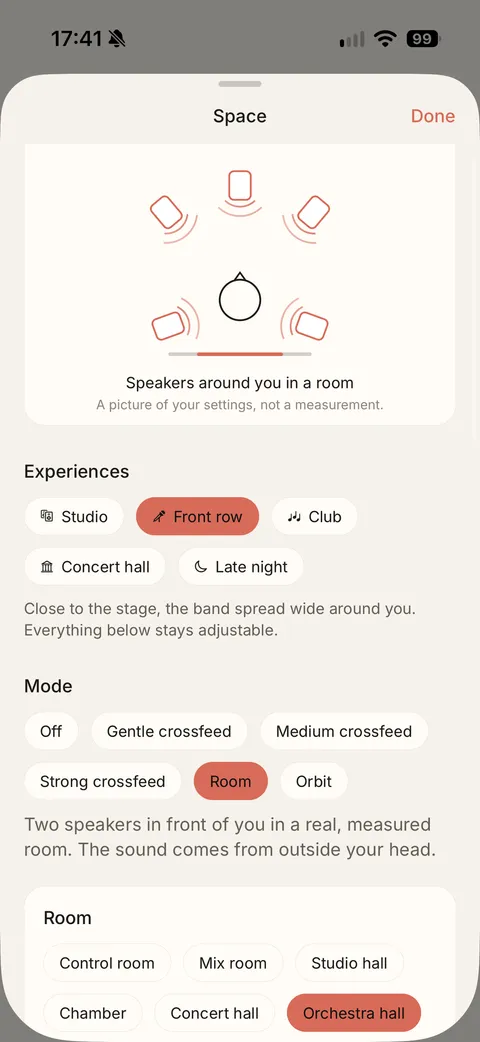
Orbit, the 8D effect
Orbit is an 8D rotating effect. It is one of the nine sound styles, and one of the modes on the Space screen, next to Off, three crossfeed strengths and Room.
The Space screen
Space is where these effects live. It starts with five experiences: Studio, Front row, Club, Concert hall and Late night. Below them, the mode is Off, Gentle crossfeed, Medium crossfeed, Strong crossfeed, Room or Orbit. A diagram shows your settings as speakers around you. It is a picture of your settings, not a measurement, and everything stays adjustable.
Six virtual rooms
Discata has six virtual rooms: Control room, Mix room, Studio hall, Chamber, Concert hall and Orchestra hall.
Which room for what
Control room and Mix room: precise and close, great for pop, electronic, hip-hop and podcasts. Studio hall and Chamber: warmer and wider. Concert hall and Orchestra hall: classical, film scores and live recordings.
In the app: Sound › Space › Room
Less room for dense music
Busy mixes (pop, techno, metal) stay clearer with the room at 60–80 %; sparse, acoustic music can take 100 %.
Clean bass
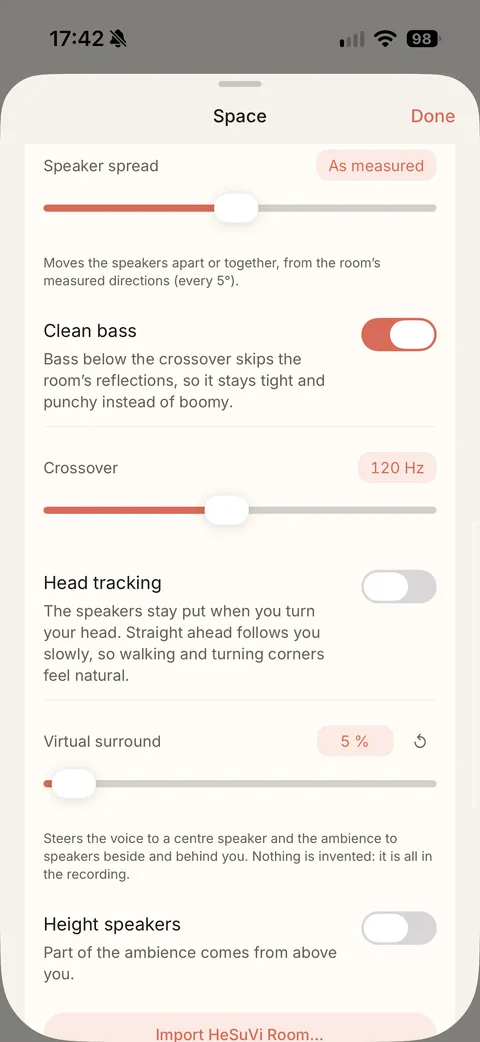
Real rooms make bass boom. Clean bass keeps the low end tight and dry while the room works on everything above it. Lower the crossover (80–100 Hz) for more room, raise it (150 Hz) for tighter bass.
In the app: Sound › Space › Clean bass
Virtual surround
Moves the spacious parts of the mix (reverb, wide synths, crowd) to speakers beside and behind you, and voices to a centre speaker where the room has one. Great for live and ambient music; turn it down for podcasts.
In the app: Sound › Space › Virtual surround
The same screen also has Speaker spread, which moves the speakers apart or together, and a Height speakers switch, which lets part of the ambience come from above you.
Crossfeed
Crossfeed has three strengths: Gentle, Medium and Strong. A room or gentle crossfeed makes long sessions less tiring than hard-panned stereo.
Head tracking
With AirPods Pro, AirPods Max or supported Beats, the speakers stay put when you turn your head, like a real room. Tap Recentre if “front” drifts.
Compare with the original
Flip Sound On / Original while a song plays. Both play at the same loudness, so you judge the sound, not the volume. EQ and rooms apply to music played in Discata, not to other apps. For the other layers of the sound, see the equaliser page and the listening guide.
Hear your music in a room
Pick a room, then flip Sound On / Original to compare it with the original file.
Download on theApp StoreFree on iPhone. Requires iOS 17 or later. No account.