Play FLAC and other lossless files on iPhone
Discata plays FLAC, ALAC, WAV and AIFF on iPhone, along with MP3 and AAC/M4A. It plays the files you own, offline, and shows what each file really is.
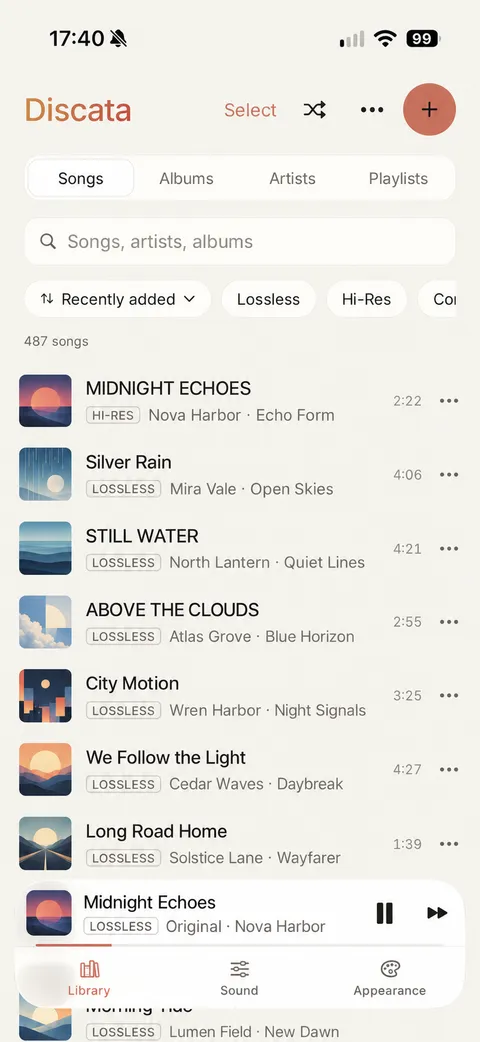
Formats Discata plays
| Format | Type | Notes |
|---|---|---|
| FLAC | Lossless | An exact copy of the master. |
| ALAC | Lossless | An exact copy of the master. |
| WAV | Lossless | An exact copy of the master. |
| AIFF | Lossless | Plays offline from your Discata library like the other lossless formats. |
| MP3 | Lossy | A good 320 kbps file is indistinguishable for most people on most headphones. |
| AAC/M4A | Lossy | A good 256 kbps file is indistinguishable for most people on most headphones. |
Files with more than two channels are mixed down to stereo.
The quality badge
Shows what the file really is (codec, bit depth, sample rate), measured from the file itself, never guessed from its name. You can see it in the library and on Now Playing, for example “FLAC · 16-bit · 44.1 kHz”.
The library screen also has filters such as Lossless and Hi-Res, next to the sort order, so you can find your lossless files quickly.
Lossless and lossy, honestly
FLAC, ALAC and WAV are exact copies of the master. Good MP3 (320 kbps) and AAC (256 kbps) are indistinguishable for most people on most headphones; bad sources (low bitrate, clipped masters) are not fixed by any setting.
Hi-res and Bluetooth
Bluetooth re-encodes everything (AirPods use AAC), so lossless and hi-res files only play at full quality through wired headphones or a USB DAC. Sample rates above 48 kHz bring no audible benefit to most listeners.
Compare with the original file
Discata can shape the sound of your files, and all processing happens on the iPhone. Flip Sound On / Original while a song plays to compare the two. Both play at the same loudness, so you judge the sound, not the volume.
Get your files onto the iPhone
- In the Library tab, tap Import music.
- Choose files from the Files app or iCloud Drive.
- Discata keeps its own copy, so your library plays offline. You can also link a folder and keep it in sync.
Discata plays files you own. It is not a streaming service, and it cannot import Apple Music or Spotify downloads, because they are protected.
Free, with one short ad card
Discata is free to download and use. The free version shows one short ad card after about every 7 minutes of listening, only between songs. You can close it after 5 seconds, and the music keeps playing. A one-time purchase of £9.99 in the UK, not a subscription, removes ads permanently.
See the offline music player page for what the library does, or the listening guide for more on file quality.
Play your lossless files
Import FLAC, ALAC, WAV or AIFF files and see what each one really is.
Download on theApp StoreFree on iPhone. Requires iOS 17 or later. No account.