Every feature, in detail
This is the full specification of Discata 1.0.0 for iPhone: what each part of the sound chain does, the ranges of every control, and where the measurements behind the rooms and headphone profiles come from. Everything is processed on your iPhone.
- 8,849headphone correction profiles, on the device
- 64EQ filters at most: 32 for tone, 32 for correction
- 6rooms measured in real broadcast studios
- 4×oversampled true-peak limiter
The sound engine
Discata has its own native audio engine. Every effect runs on the iPhone, in a fixed order, and the delay through the chain is the same whichever effects are on.
| Signal path | 32-bit floating-point audio. Equaliser filters are calculated and run with 64-bit precision. |
|---|---|
| Order of processing | Tone level → tone EQ → stereo width → space (crossfeed, room or Orbit) → correction level → headphone correction EQ → Sound On / Original mix → Discata volume → true-peak limiter. |
| Why that order | Tone shapes the music before it is placed in a room. Headphone correction runs after the room, so it corrects the headphones without bending the spatial cues. |
| Processing rate | The sample rate of the current output. Files at another rate are converted by iOS before processing. |
| Constant delay | Every mode is time-aligned, so switching a mode, or switching to Original, never shifts the music in time. The Output screen shows the delay in milliseconds. |
| Smooth changes | Level changes ramp over 10 ms, and changes of mode crossfade over 30 ms, so nothing clicks. |
| Real-time safety | The audio thread never allocates memory, takes a lock or waits. |
| Battery | The engine goes to sleep 10 seconds after you pause, and digital silence is skipped instead of processed. |
| Engine check | The About screen can run a test tone through the engine and show the calculated and the measured gain side by side. |
Tone equaliser
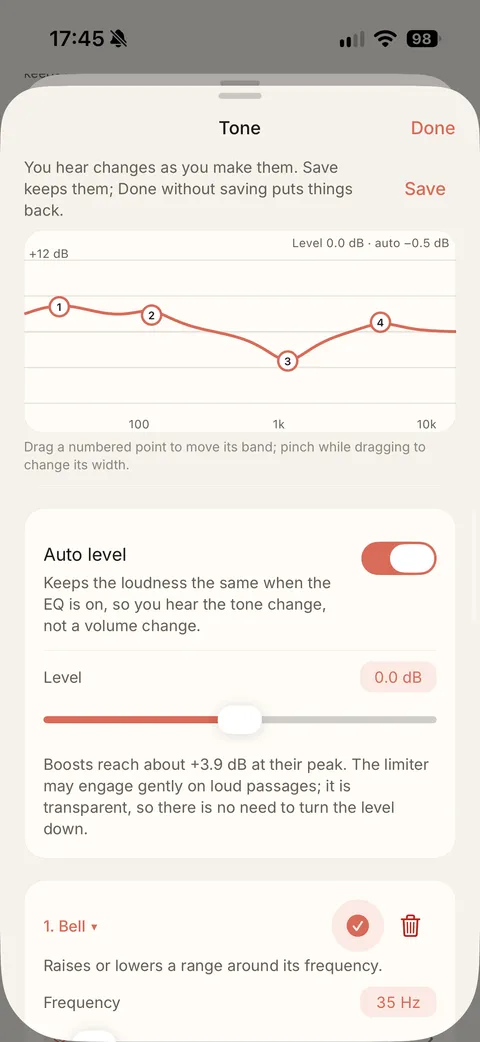
Tone is for taste. Use the 10-band graphic editor for quick changes, or the parametric editor for full control. The response curve is drawn as you edit, and you can drag and pinch the points on it.
| Parametric bands | Up to 32, each with its own on/off switch. |
|---|---|
| Filter shapes | Peaking, low shelf, high shelf, low pass and high pass. |
| Frequency | 20 Hz to 20 kHz in the editor. |
| Gain | −18 to +18 dB per band in the editor, in 0.5 dB steps. |
| Width (Q) | 0.1 to 20 in the editor. |
| Imported profiles | Accepted from 1 Hz to 20 kHz, −30 to +30 dB and Q 0.05 to 50. |
| Graphic EQ | 10 bands at 31.25, 62.5, 125, 250, 500 Hz, 1, 2, 4, 8 and 16 kHz, each −12 to +12 dB in 0.5 dB steps. |
| Overlap compensation | Neighbouring graphic bands overlap, so Discata adjusts them to hit the level you set at each frequency. |
| Auto level | Keeps the loudness the same when the EQ is on, so you hear the tone change, not a volume change. A Level trim of −6 to +6 dB sits on top. |
| Manual preamp | With Auto level off, −30 to +12 dB. |
| Filter design | Audio EQ Cookbook biquad filters. |
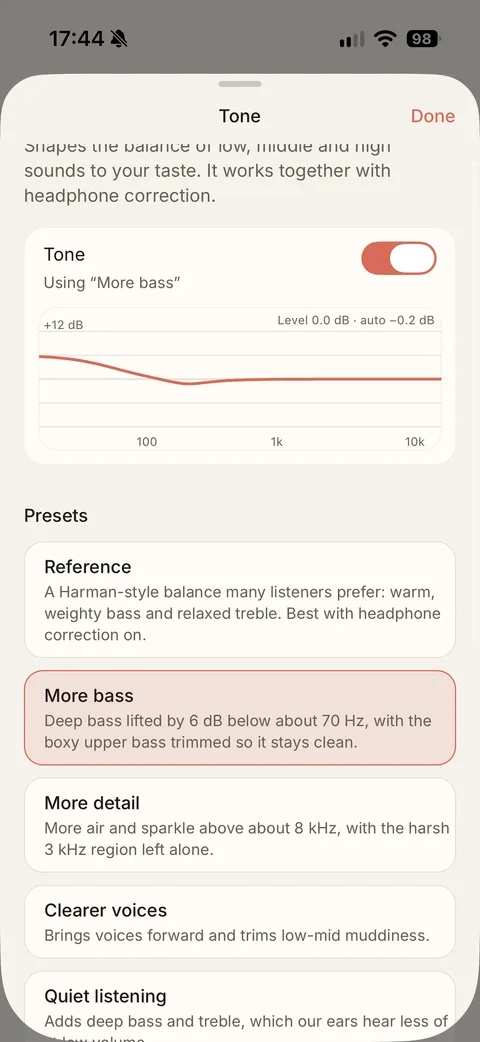
| Presets | Seven: Reference, More bass, More detail, Clearer voices, Quiet listening, Immersive and Less harsh. Each has a description in plain words. |
| Sound styles | Nine one-tap starting points: Balanced, Reference, Bass, Treble, Immersive, Speakers, Vocals, Chill and Orbit. |
| Import | AutoEq and Equalizer APO ParametricEQ.txt files, GraphicEQ.txt files (followed with 31 third-octave bands) and Discata JSON. |
| Share | Any profile as ParametricEQ.txt or as Discata JSON. |
In the app: Sound › Tone
Headphone correction
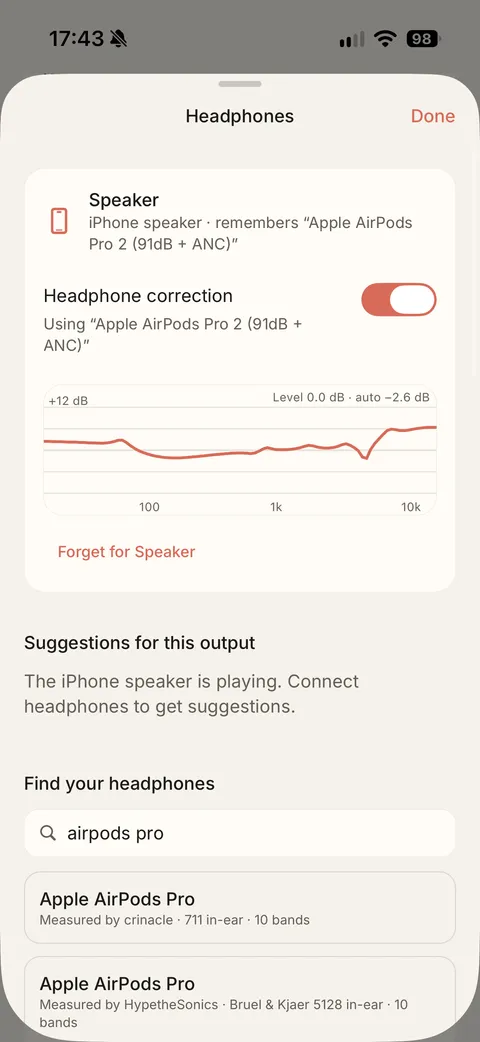
Correction is about your headphones, not your taste. It is a separate equaliser stage with its own 32 bands, so a full correction profile and a full tone profile can run together.
| Profiles | 8,849, from the open AutoEq project, stored in the app. |
|---|---|
| Search | By headphone model, offline. |
| Suggestions | Discata suggests profiles from the name of the headphones you connect. Nothing is scanned and nothing is sent anywhere. |
| Per output | Your choice is remembered for each output, so each pair of headphones gets its own correction. |
| Own stage | Up to 32 bands, separate from the 32 tone bands, with its own Auto level. |
| Your own files | Import a correction file in the same formats as tone profiles. |
In the app: Sound › Headphones
Space: 8D rooms and crossfeed
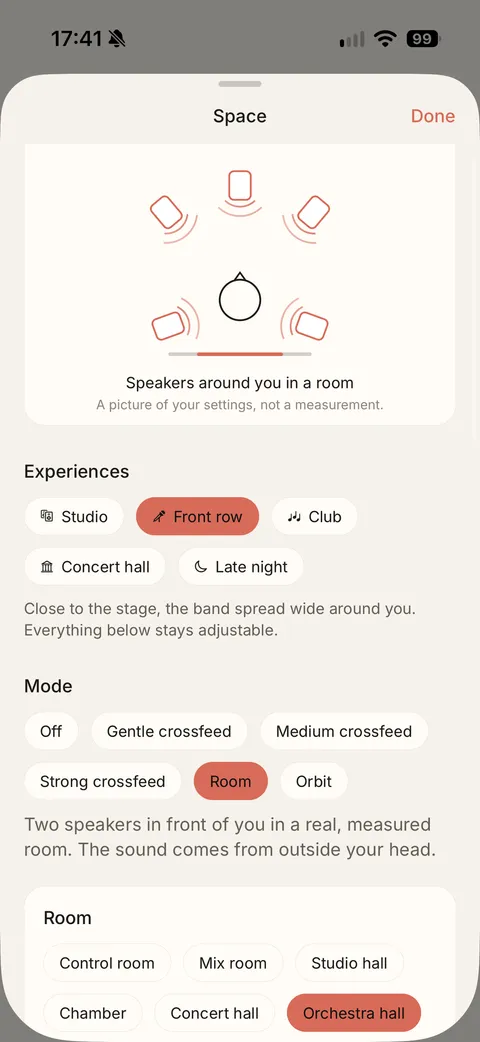
Space moves the music out of your head. Choose one mode at a time: Off, one of three crossfeed strengths, Room or Orbit. These effects are made for headphones.
8D audio: six measured rooms
In Discata, 8D audio means music that comes from around you, and it is built on rooms. The rooms are not synthetic reverb. Each one is a set of impulse responses measured with a dummy-head microphone in the broadcast studios of WDR in Cologne, for 72 directions of the head, one every 5°.
| Room | Measured in | Sound source | Length |
|---|---|---|---|
| Control room | WDR Control Room 1 | Studio monitors, close by | 0.3 s |
| Mix room | WDR Control Room 7 | Studio monitors in a larger control room | 0.4 s |
| Studio hall | WDR Small Broadcast Studio | PA speakers with a centre speaker | 0.85 s |
| Chamber | WDR Small Broadcast Studio | Omnidirectional source on stage | 0.9 s |
| Concert hall | WDR Large Broadcast Studio (Klaus von Bismarck Saal) | PA speakers with a centre speaker | 1.8 s |
| Orchestra hall | WDR Large Broadcast Studio (Klaus von Bismarck Saal) | Omnidirectional sources on stage | 1.9 s |
Length is how much of each measured response Discata uses.
Room controls
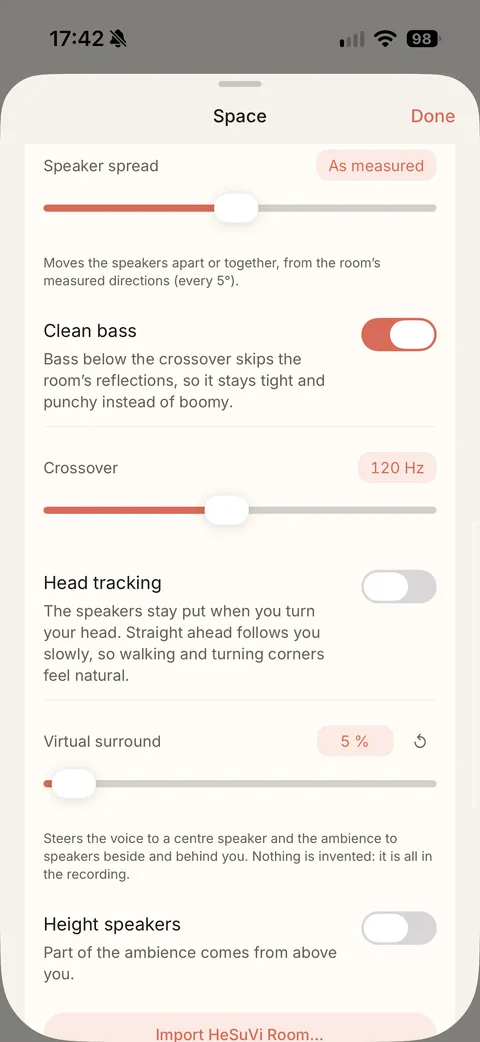
| Room reflections | 0 to 100 %. 100 % is the room as measured; lower keeps the speakers but makes the room drier. |
|---|---|
| Speaker spread | −15° to +15° in 1° steps, from the room’s measured directions. |
| Clean bass | Bass below a crossover skips the room’s reflections, so it stays tight. The crossover is a 4th-order Linkwitz–Riley filter, 60 to 200 Hz in 10 Hz steps, 120 Hz by default. |
| Head tracking | With AirPods Pro, AirPods Max and some Beats, the speakers stay put when you turn your head. Recentre sets a new straight ahead. |
| Virtual surround | 0 to 100 %. Steers the voice to a centre speaker and the ambience to speakers beside and behind you. Nothing is invented: it is all in the recording. |
| Height speakers | Part of the ambience comes from above you, at 45° elevation. |
| Experiences | Five one-tap setups: Studio, Front row, Club, Concert hall and Late night. Everything stays adjustable afterwards. |
| Loud masters | A slow headroom control keeps loud, dense masters from leaning on the limiter. |
| Your own room | Import a HeSuVi impulse response file. Spread, head tracking and virtual surround work with the bundled rooms. |
| Diagram | The Space screen draws your settings as speakers around you. It is a picture of your settings, not a measurement. |
| Convolution | Partitioned FFT convolution, using Apple’s Accelerate framework. |
Crossfeed
| Strength | Setting | Cut-off | Level of the crossfed signal |
|---|---|---|---|
| Gentle | Jan Meier | 650 Hz | 9.5 dB below the direct signal |
| Medium | Chu Moy | 700 Hz | 6 dB below the direct signal |
| Strong | bs2b default | 700 Hz | 4.5 dB below the direct signal |
Orbit, a motion effect
| Motion | The whole mix circles around your head. One circle takes 2 to 30 seconds; 8 seconds by default. |
|---|---|
| Stereo is kept | Left and right travel together as two sources 60° apart, so the stereo picture survives while it moves. |
| How it is made | Level differences between the ears, a time difference of up to 0.66 ms, and filtering for the shadow of the head and for sounds behind you. |
| What it is | A creative effect, not a room. |
Stereo width
Stereo width runs from 0 to 200 %. 100 % is the original, 0 % is mono, and above 100 % widens the image.
In the app: Sound › Space
Room measurements: “A Spatial Audio Impulse Response Compilation Captured at the WDR Broadcast Studios” by Philipp Stade, Benjamin Bernschütz and Maximilian Rühl, Technische Hochschule Köln (Zenodo record 3820044, CC BY-SA). Height speakers: SADIE II database, University of York (Apache 2.0).
Loudness and output
Discata measures how loud your music is and can even it out without squashing it. A limiter at the very end catches the peaks that EQ boosts, rooms and crossfades can cause.
| Normalisation | Off, Track or Album. Track evens out shuffles and playlists; Album keeps the loud and quiet songs of an album as the artist intended. |
|---|---|
| Measurement | On the iPhone after import, to ITU-R BS.1770-4. ReplayGain and R128 tags in your files are read too. |
| Target level | −14, −16 or −18 LUFS, with a target adjustment of −12 to +12 dB in 0.5 dB steps. |
| Prevent clipping | Holds back the gain for songs whose peaks would otherwise distort. |
| Limiter | Look-ahead true-peak limiter. Peaks are detected on a 4× oversampled signal, so peaks between samples are caught too. |
| Limiter timing | 5 ms look-ahead, with a fast release (50 ms) for single peaks and a slow one (400 ms) for sustained loud passages. |
| Ceiling | 0 to −12 dB in 0.5 dB steps, −1 dB by default. The limiter can be switched off. |
| Limiter read-out | The Output screen tells you when the limiter has recently reduced peaks, and by how much. |
| Discata volume | A separate volume for Discata, applied before the limiter. |
| Output facts | The Output screen shows the output’s name and type, the processing rate, the processing delay, the output delay and the number of dropouts this session. |
In the app: Sound › Playback and Sound › Output
Sound On / Original
One switch compares everything you have set up with the file as it is.
| What Original bypasses | Tone, headphone correction, space, width and the limiter. |
|---|---|
| Level-matched | Original is matched to the loudness of the processed sound, by up to 12 dB either way, so you judge the sound, not the volume. |
| Time-aligned | Both paths have the same delay, and the switch crossfades in 30 ms, so the music does not jump. |
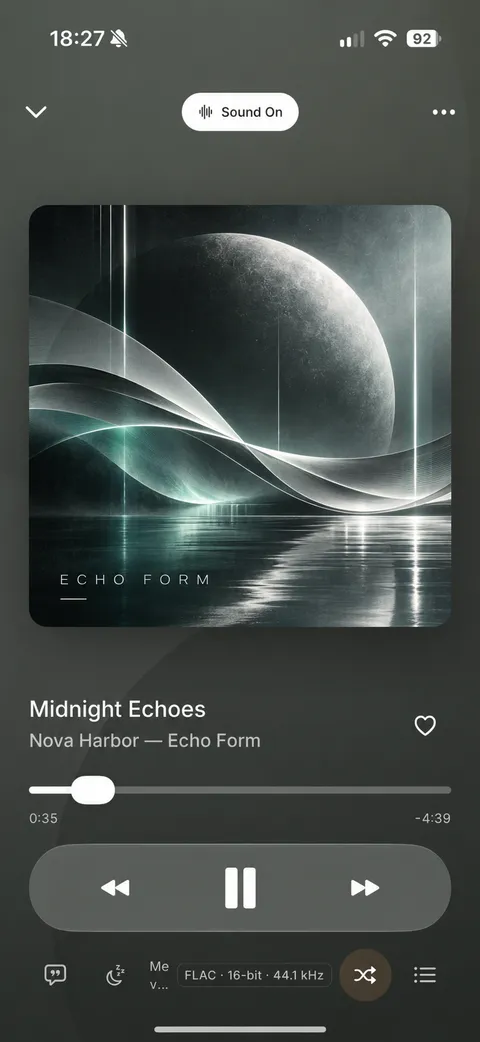
| Where | At the top of the Sound tab and in the player. |
| Sound setups | Save tone, correction, space, width, volume and limiter together under a name, and switch between setups in one tap. |
Playback
Discata plays the music files you own, offline.
| Formats | FLAC, ALAC, WAV and AIFF (lossless); MP3 and AAC/M4A (lossy). |
|---|---|
| Decoding | By the decoders built into iOS. |
| Channels | Stereo and mono. Files with more than two channels are mixed down to stereo. |
| Gapless | With crossfade off, songs play back to back with no gap. |
| Crossfade | 0.5 to 12 seconds in 0.5 second steps, equal power. “Keep albums gapless” leaves consecutive songs of the same album untouched. |
| Skip silence | Removes long silent stretches at the start and end of songs. Threshold −80 to −30 dB (−50 dB by default), for silences of at least 0.5 to 5 seconds (1 second by default). Fades and short pauses are kept. |
| Queue | Play Next, Add to Queue and remove from the queue. |
| Smart Shuffle | Learns on your iPhone from what you finish and skip. It avoids the same artist twice within 3 songs and the same album twice within 5, and brings back songs you have not heard for 30 days. It can be switched off, and the history can be cleared. |
| Sleep timer | 15, 30, 45, 60 or 90 minutes, or the end of the current song. |
| In the background | Background playback, with controls on the lock screen and in Control Centre. |
| Quality badge | Codec, bit depth and sample rate, measured from the file itself, never guessed from its name. |
Library
Your library lives on your iPhone and needs no account.
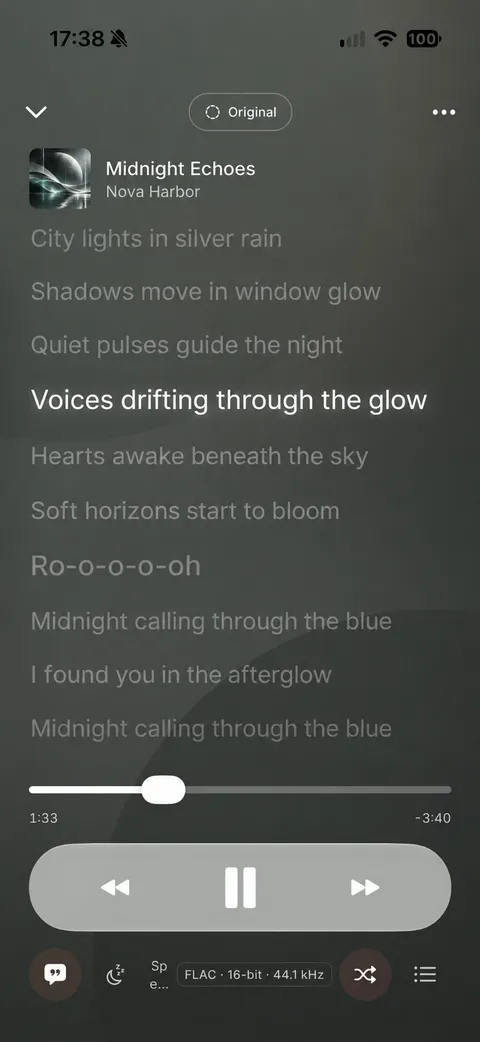
| Adding music | Import files from Files or iCloud Drive; Discata keeps its own copy. Or link a folder and keep it in sync. |
|---|---|
| Views | Songs, Albums, Artists and Playlists. |
| Search | One field searches titles, artists and albums. |
| Filters | Favourites, Lossless, Hi-Res, Compressed, added in the last 30 days, and by artist or album, with a choice of sort order. |
| Hi-Res | Shown for lossless files above 16-bit or above 48 kHz. |
| Multi-select | Play, queue or add many songs to a playlist at once. |
| Playlists | Reorder, pin, search within a playlist, import files straight into one, and give each its own artwork from Photos or Files. |
| Artwork | From the file, from an image in the same folder, or from an opt-in online look-up. |
| Your Listening | Top artists, albums and songs for a period you choose, with a text summary you can share. The history stays on your iPhone. |
| Demo song | A 41-second public-domain Beethoven excerpt, so you can try the sound before importing anything. |
Lyrics
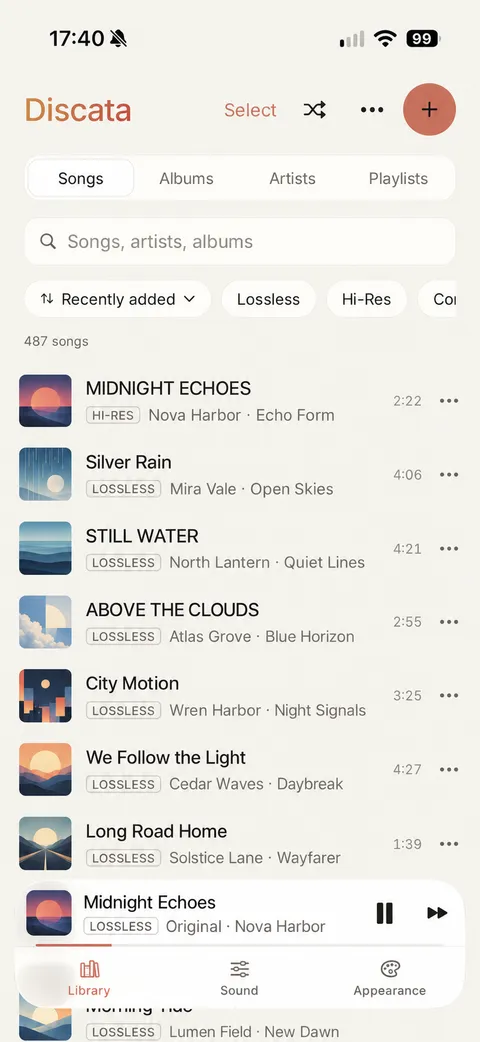
Lyrics follow the song, line by line and word by word.
| Sources | Lyrics inside the file, a .lrc or text file you import, or an opt-in online look-up where you choose from the results. |
|---|---|
| Line timing | The current line is highlighted from the times in the lyrics. |
| Word timing | Exact when the lyrics carry word times (enhanced LRC); otherwise estimated within the line. |
| Interludes | Long instrumental gaps are shown, so you know the lyrics have not stalled. |
| Bluetooth delay | Compensated automatically, so lyrics stay in step on wireless headphones. |
| Untimed lyrics | Shown as plain text. |
Interface and customisation
Discata is designed to be read at a glance and shaped to your taste. Almost everything you see can be changed, and nothing you change touches the sound.
| Theme | Auto, Paper (light), Ink (dark) or OLED (true black). |
|---|---|
| Colour presets | Five: Listening room, Midnight, Vinyl, Studio and High contrast, each in light and dark. |
| Your colours | Pick an accent from swatches or enter any hex colour, and add a background tint. |
| Readable by design | If a colour you choose would be hard to read, Discata adjusts it to keep text contrast and tells you what it changed. |
| Artwork colours | The player can take its colours from the song’s cover, and the whole app can take a gentle tint from it. |
| Glass | A slider sets how translucent the glass surfaces are. |
| Fonts | SF Pro, Inter or Roboto. |
| Library layout | Compact, Regular or Roomy rows; 2, 3 or 4 grid columns; a choice of what the second line shows; quality badge and song length on or off. |
| Player layout | Large or medium artwork, and each button (lyrics, queue, sleep timer, output, favourite) can be shown or hidden. |
| Motion and haptics | Motion like iOS, full or reduced; haptics on or off. |
| Saved looks | Save up to 12 complete looks and switch between them. |
| Accessibility | Follows the iOS Reduce Transparency, Increase Contrast and Reduce Motion settings. Controls carry VoiceOver labels, including the points on the EQ curve. |
| First run | A setup you can skip, with a demo song and one-tap sound styles. You can run it again from About. |
| Help | A Listening Guide inside the app, and Report a Problem, which opens an email you see before sending. |
In the app: Appearance
Privacy and price
| Account | None. There is nothing to sign in to. |
|---|---|
| On your device | All sound processing, your library, playlists, settings and listening history. |
| Online look-ups | Off until you allow them. They send only a song’s title, artist, album and length to MusicBrainz, the Cover Art Archive and LRCLIB. |
| Price | Free. The free version shows one short ad card after about every 7 minutes of listening, only between songs. You can close it after 5 seconds, and the music keeps playing. |
| Ad-free forever | A one-time purchase of £9.99 in the UK, not a subscription. It works on all your devices signed in to the same Apple Account. |
| Requires | iPhone with iOS 17 or later. |
See the Privacy Policy for how ads and your privacy choices work.
What Discata does not do
- It is not a streaming service, and it has no music catalogue or cloud library.
- It cannot import Apple Music or Spotify downloads, because they are protected.
- It does not play DSD, APE, WavPack or Ogg files.
- It is built to shape the sound, so it has no bit-perfect output mode. Original is a level-matched comparison, not a bit-perfect path.
- Files with more than two channels are mixed down to stereo.
- It is for iPhone only. There is no Android version, no iPad version and no CarPlay.
For the thinking behind each setting, read the listening guide, or see the pages on the equaliser, 8D audio and rooms, lossless files and the offline player.
Hear it with your own music
Download Discata free from the App Store and bring in the music you already own.
Download on theApp StoreFree on iPhone. Requires iOS 17 or later. No account.